
Hours and timesheets
See each person's hours, fix a time that's wrong, and set working hours and time off.
Timesheets are on Full Suite.
How time is recorded
- Your crew taps Start my day and End my day on their phone.
- Each visit records its own time, from Start visit to Complete visit.
Only an Admin can turn Track crew hours on or off. Time on visits is recorded either way.
See the hours
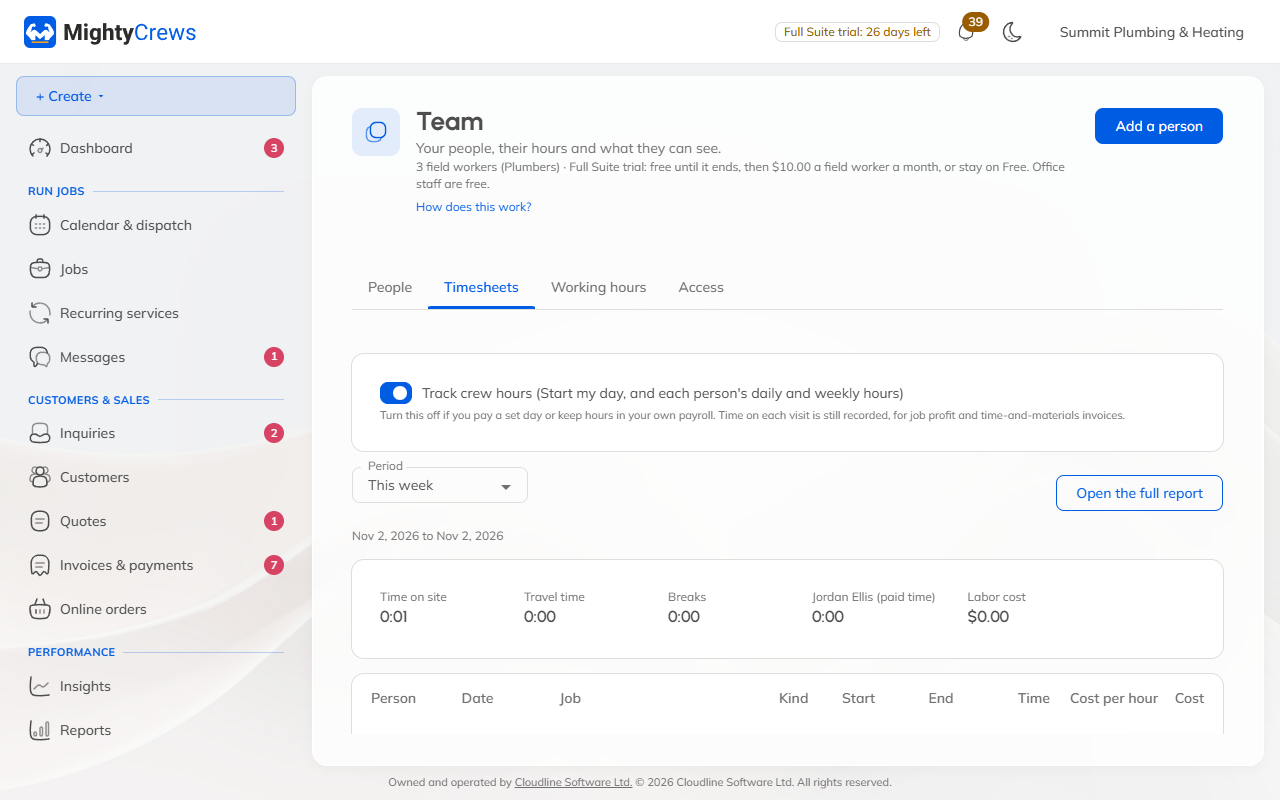
Open Team & permissions and the Timesheets tab. Choose a period, like this week. Open the full report to download it for payroll.
Fix a time
Click Fix next to the time, change the start or end (or delete it), and say why. The original time is kept on record.
A time that's already on an invoice can't be changed. A day left running is stopped at midnight and marked.
Working hours and time off
On the Working hours tab, set your business hours, each person's own hours, and time off. The calendar greys these out, and online booking won't offer them.
Still stuck? Open Help & support in the app and write to us, or email support@mightycrews.com.