
Roles and permissions
Choose what your office, your crew and your accountant can see and do.
The roles
- Admin: everything, including settings, the plan and who can sign in.
- Office: books work, and handles customers, quotes, invoices and payments.
- Field (your team's name for it, like Plumber): goes out on visits.
- Accountant: sees invoices, payments and reports, read only.
Choose someone's role when you add them, or change it later under Who can sign in.
What each role can do
- Open Team & permissions and the Access tab.
- Under What each role can do, turn each switch on or off. It saves straight away.
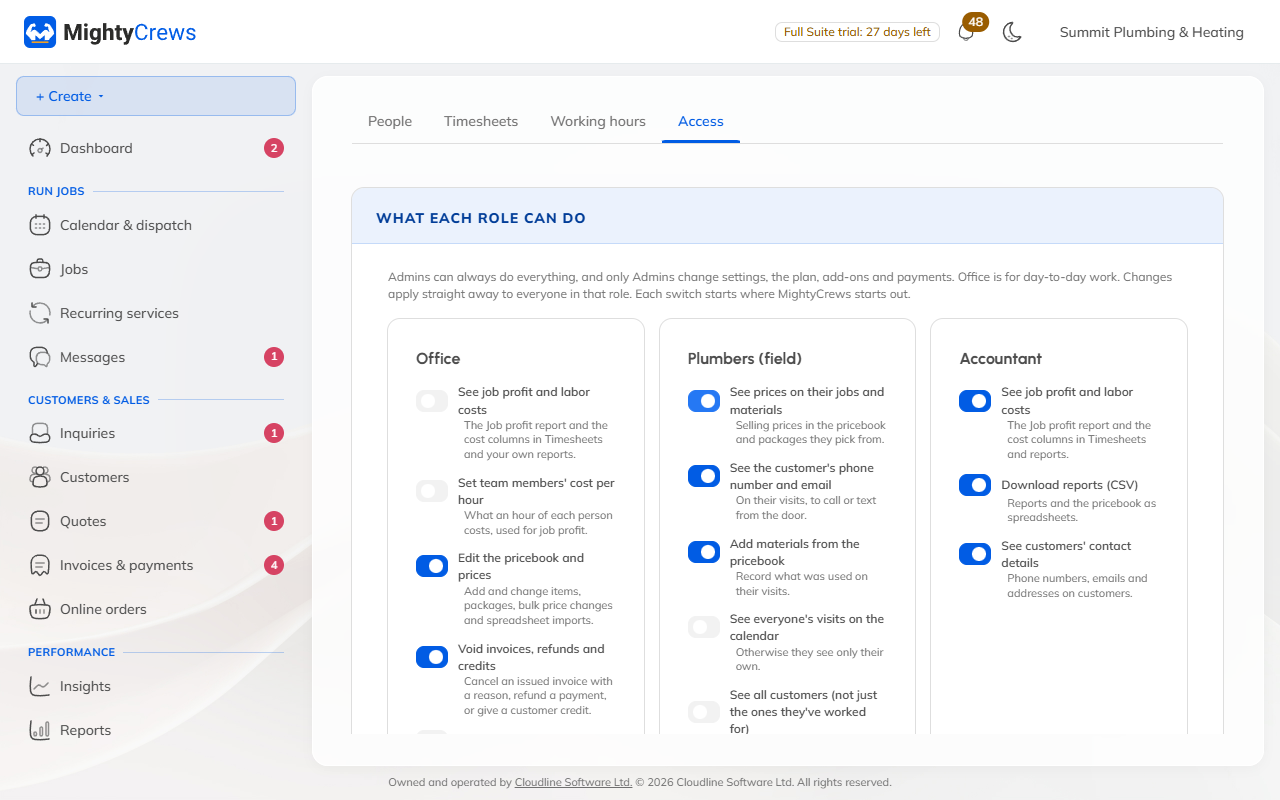
Some of the switches:
- Field: see prices, see the customer's phone and email, see everyone's visits, send the invoice when they finish, record cash or cheque payments, write quotes, ask for reviews.
- Office: see job profit and labour costs, edit the price book, void invoices, import customers, manage the team's accounts.
- Accountant: see job profit, download reports, see customers' contact details.
Reset puts a role back to how it started. Someone a switch keeps out sees "An Admin hasn't turned this on for your role."
Changing the switches is on Full Suite. On Free, every role works the way it starts.
Still stuck? Open Help & support in the app and write to us, or email support@mightycrews.com.