
Invite your team
Add your crew and office staff, and email each of them an invitation to sign in.
Everyone on your team gets their own sign-in. Your crew sees their day on their phone or tablet, and your office sees everything they need.
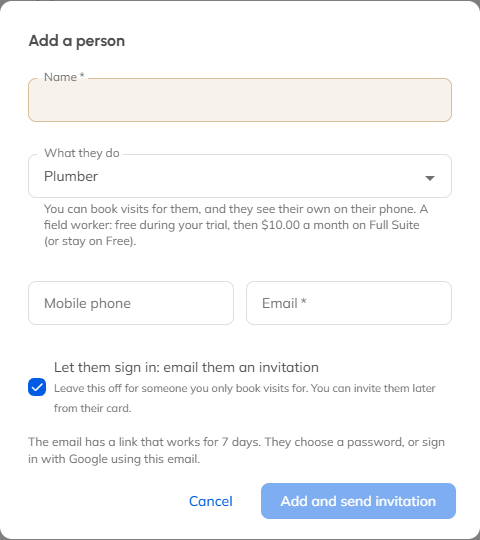
Add a person
- Open Team & permissions in the menu.
- Click Add a person.
- Type their name.
- Choose what they do: a field worker (who goes out on visits), Office, Admin, or Accountant (read only).
- Add their email. For a field worker, leave Let them sign in: email them an invitation ticked.
- Click Add and send invitation.
What they get
They get an email from your business with an Accept the invitation button. They choose a password (or continue with Google), and they're in. Field workers land on their day, ready to go.
The invitation link works once, for 7 days. If it runs out, open the person on the Access tab and click Resend.
What it costs
Office staff, Admins and Accountants are always free. On a paid plan you pay for each field worker, and MightyCrews shows you the new monthly price before you add one.
You can change what each role is allowed to do on the Access tab, under What each role can do. Changing it needs Full Suite.
Still stuck? Open Help & support in the app and write to us, or email support@mightycrews.com.